<実行結果>
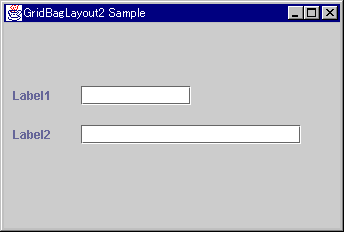
コンポーネント間に隙間が開きました
画面レイアウトをGridBagLayoutにする 2
コンポーネント間に隙間をあけて、バランス良く配置します。
import java.awt.*;
import javax.swing.*;
class ExamGBLayout2 extends JFrame {
   ExamGBLayout2() {
      setTitle("GridBagLayout2 Sample");
      Container pane = getContentPane();
      GridBagLayout gbl = new GridBagLayout();
      pane.setLayout(gbl);
      GridBagConstraints gbc = new GridBagConstraints();
      //Label1
      JLabel label1 = new JLabel("Label1");
      gbc.gridx = 0;
      gbc.gridy = 0;
      gbc.insets.bottom = 20;
      gbc.insets.right = 30;
      gbl.setConstraints(label1, gbc);
      pane.add(label1);
      //Label2
      JLabel label2 = new JLabel("Label2");
      gbc.gridx = 0;
      gbc.gridy = 1;
      gbc.insets.right = 30;
      gbl.setConstraints(label2, gbc);
      pane.add(label2);
      //text1
      JTextField jtf1 = new JTextField(10);
      gbc.gridx = 1;
      gbc.gridy = 0;
      gbc.insets.bottom = 20;
      gbl.setConstraints(jtf1, gbc);
      pane.add(jtf1);
      //text2
      JTextField jtf2 = new JTextField(20);
      gbc.gridx = 1;
      gbc.gridy = 1;
      gbc.gridwidth = 3;
      gbc.gridheight = 1;
      gbl.setConstraints(jtf2, gbc);
      pane.add(jtf2);
   }
   public static void main(String[] args) {
      ExsamGBLayout2 egb = new ExsamGBLayout2();
      egb.setSize(400,300);
      egb.setVisible(true);
   }
}
<実行結果>
コンポーネント間に隙間が開きました
| <GridBagConstraints> | GridBagConstraintsクラスのinsets フィールド を使ってコンポーネント間に隙間をあけることができます。 gbc.insets.bottom = 20; gbc.insets.right = 30; そのほかにもレイアウトを作る多くのフィールドがあります。 |